


A few weeks ago, my friend Kalid and I were eating tacos at Tacos Chukis (the best tacos in Seattle, and I will die on this hill!) and talking about OpenClaw.
If you haven’t seen it, OpenClaw is one of the more exciting projects in the AI tooling space right now. It’s an open-source framework that lets you build a deeply personalized AI assistant, and because it’s open source, it’s almost infinitely customizable. You can wire it into your calendar, your email, your file system, whatever services matter to your workflow.
We’d both been using it heavily. Kalid runs Instacalc and Better Explained, and he’s always experimenting with tools that make complex work more tractable. I’d been trying to build a “morning brief” workflow where OpenClaw would synthesize my day, pulling together my calendar, family scheduling, notable events, and things I needed to know. It required access to multiple services, research capabilities, and a fairly elaborate plan.
The problem was that OpenClaw kept losing context. So. Damn. Frustrating 🤡
Over 30 mins, my session compacted eight times. Each time, detail disappeared and I’d have to re-explain things I’d already established. Eventually I had the agent create a markdown file to use as its own memory, which worked but felt like duct tape on a structural problem.
Kalid had been hitting the same wall, so we started talking about why.

The markdown file problem
If you’ve worked with AI agents for any length of time, you’ve probably arrived at the same workaround I did: markdown files as memory.
It’s become the de facto pattern in the post-AI world. Agents create markdown files for plans, add tasks as they go, and edit the files to mark things complete. I’ve built this into custom skills and agents myself over the past year, and it kind of works.
But it doesn’t scale well. How do you query tasks across multiple files? How do you organize them across projects? You end up with a sprawl of markdown documents scattered through your repo, using folders and your filesystem as an improvised task management platform. It functions, but it’s not optimal, and it breaks down entirely when you’re coordinating multiple agents or working on projects that don’t live in a git repository at all.
Human tools don’t speak agent
The obvious next step was to use a real task manager. We tried the built-in OpenClaw tools first, but they didn’t fit. Then we considered plugging in third-party services like Todoist or Linear, and those felt wrong too.
First, they’re slow. These are remote services optimized for human interaction speeds, and when you’re coordinating agent work, you want something fast. That typically means CLI-native and local.
Second, they’re built for humans. They assume workers have persistent memory, can update their own status naturally, and communicate blockers without prompting. They’re designed for people who remember what they were doing yesterday, and agents don’t have these properties. Context windows compact, sessions end, crashes happen, you close your laptop to sleep. When you resume, the agent doesn’t remember what it was doing, and there’s no durable record of where things stand.
Third, mixing agent work with your personal task list creates its own problems: agents and humans stepping on each other, different cadences of work, different granularities of tasks. It gets messy.
There’s also the multi-agent problem. It’s increasingly common to use different models for different tasks. Claude Code for some things, Gemini for others, local models when you want speed or privacy. Sometimes the choice is capability-driven because certain models handle certain tasks better, and sometimes it’s financial because you’re balancing costs across providers. Either way, you end up coordinating work across agents that have no shared memory and no awareness of each other.
We kept circling back to the same realization: the coordination infrastructure doesn’t exist. Markdown files are too unstructured, and human tools are too slow, too feature-heavy, and designed for a different kind of worker. What’s needed is something optimized for agent access.
Building HZL
We knew there were probably a thousand projects in this space already, but this was an excuse to build something together. We’d known each other for twenty years, our families are close, our social circles overlap, and we’ve always talked shop about technology and projects, but we’d never shipped anything as collaborators. Tacos created an opportunity.
We honestly weren’t sure it would work well, but along the way we were surprised at how right it felt for the problem at hand.
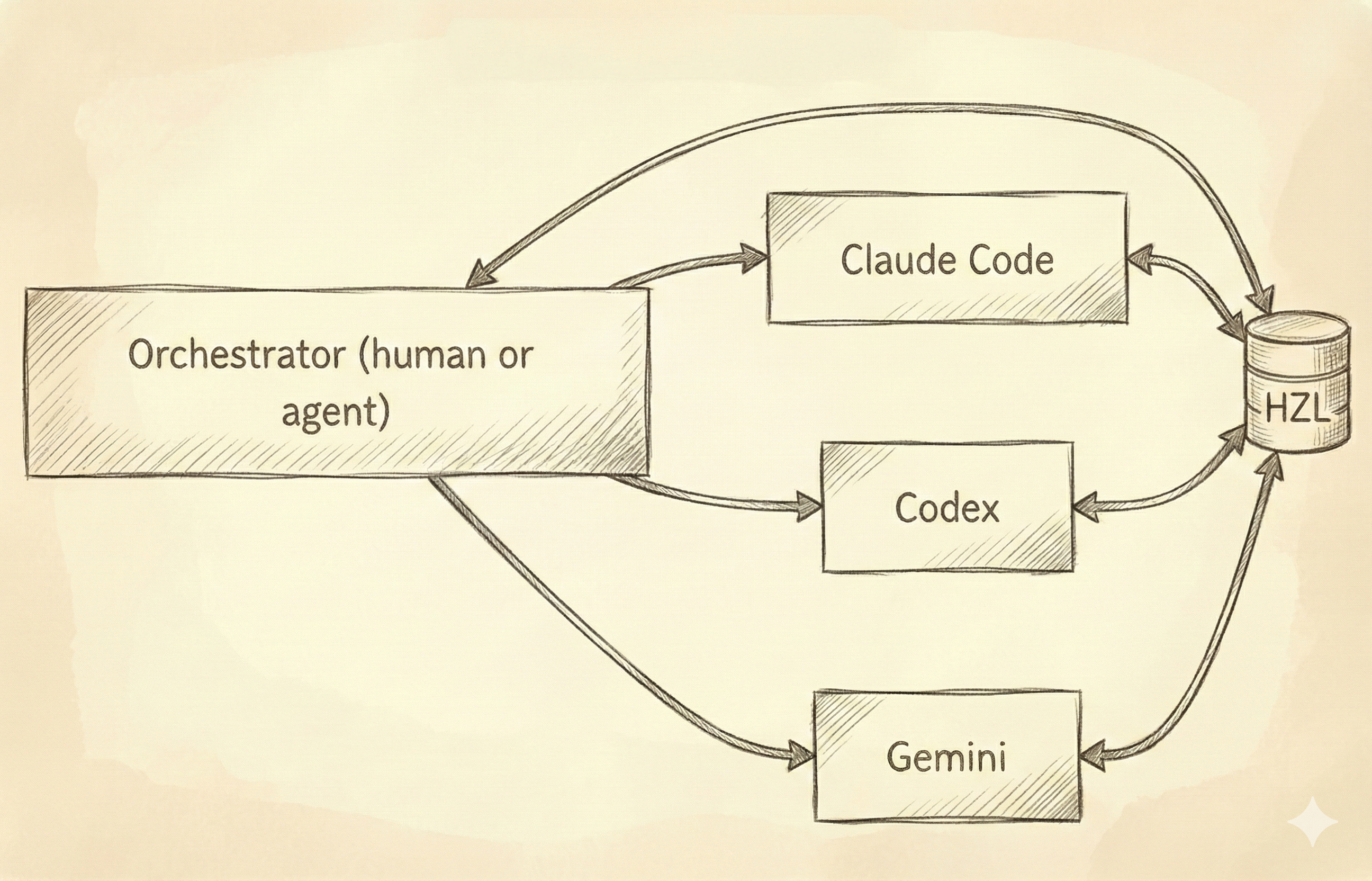
HZL is an external task ledger for AI agents. It’s backend-first, CLI-native, and model-agnostic. The core idea is simple: give agents a durable place to track work that survives context compaction, session restarts, and switches between models.
The initial brainstorm took about fifteen minutes. We recorded our conversation using Granola, then fed the summary into the Compound Engineering plugin’s brainstorming skill. From there, we iterated on an implementation plan using ChatGPT 5.2 Pro for another twenty or thirty minutes.
Then we started building, using a mix of Claude Code and Gemini for implementation. The split was partly by design and partly because I ran out of my Claude Code Max limits mid-session. The switch created exactly the kind of friction HZL is meant to solve. We had to create markdown documents and ensure both Claude Code and Gemini were marking off tasks in the same file, committing updates to the repo so neither agent would re-implement completed work or miss incomplete tasks. It was ironic, and it was validating.
The first working version took about four hours end-to-end. We’ve iterated remotely over the following days, adding features and smoothing rough edges, but the core has stayed stable.
How HZL works
Some people will immediately point to Steve Yegge’s Beads (or ports like beads-rust), which I’ve written about before. It’s an exciting project with real adoption, but it never quite resonated with my workflow. The complexity and its tight focus on repositories didn’t fit how I work, and the git hook integration in particular gave me enough grief that I never settled into a comfortable rhythm with it.
HZL is simpler by design. It’s a ledger, a task tracker. There are tasks and subtasks, one level of nesting deep, and that’s it. No epics, no bug types, no elaborate hierarchies. It doesn’t try to handle orchestration or coordination, leaving that to other tools. It just gives agents a durable, queryable place to track work with minimal structure for organization.
No repo required. This matters more than it might seem. In software, we naturally think of projects as GitHub repos and codebases, but complex work often involves research, planning, and execution of things that have nothing to do with code. My morning brief project wasn’t a codebase. It was a workflow involving calendar access, email parsing, and information synthesis, and that kind of work needs task tracking too without assuming a git repository exists.
Machine-readable everything. JSON output, CLI-first interface, explicit status transitions. Agents can query and update programmatically without parsing human-friendly formatting.
Lease support. When an agent claims a task, it can take a time-limited lease. If the agent dies, crashes, or gets stuck, the lease expires and another agent can pick up the work. Tasks don’t get permanently stuck because an agent wandered off. We may add traditional assignments in the future, but time-based leases solve a real problem that static assignments don’t.
Checkpoint-oriented design. Agents can save progress snapshots as structured state that another agent instance can parse and continue from. When context compacts or a session restarts, the checkpoint gives the next agent what it needs to resume. There are comments too, but the design centers on machine-readable resumption rather than human-readable updates.
One design choice worth noting: HZL assumes a single ledger for all your projects. We’re not doing per-folder tracking with isolated ledgers in different directories. Instead, a single HZL instance supports multiple projects through project IDs within the same ledger, which keeps things simple and queryable across everything you’re working on.
The technical implementation prioritizes speed. It’s local-first SQLite with a CLI interface because fast matters when agents are querying and updating task state. Turso cloud sync is completely optional if you want to sync to the cloud, but the primary interface is local.
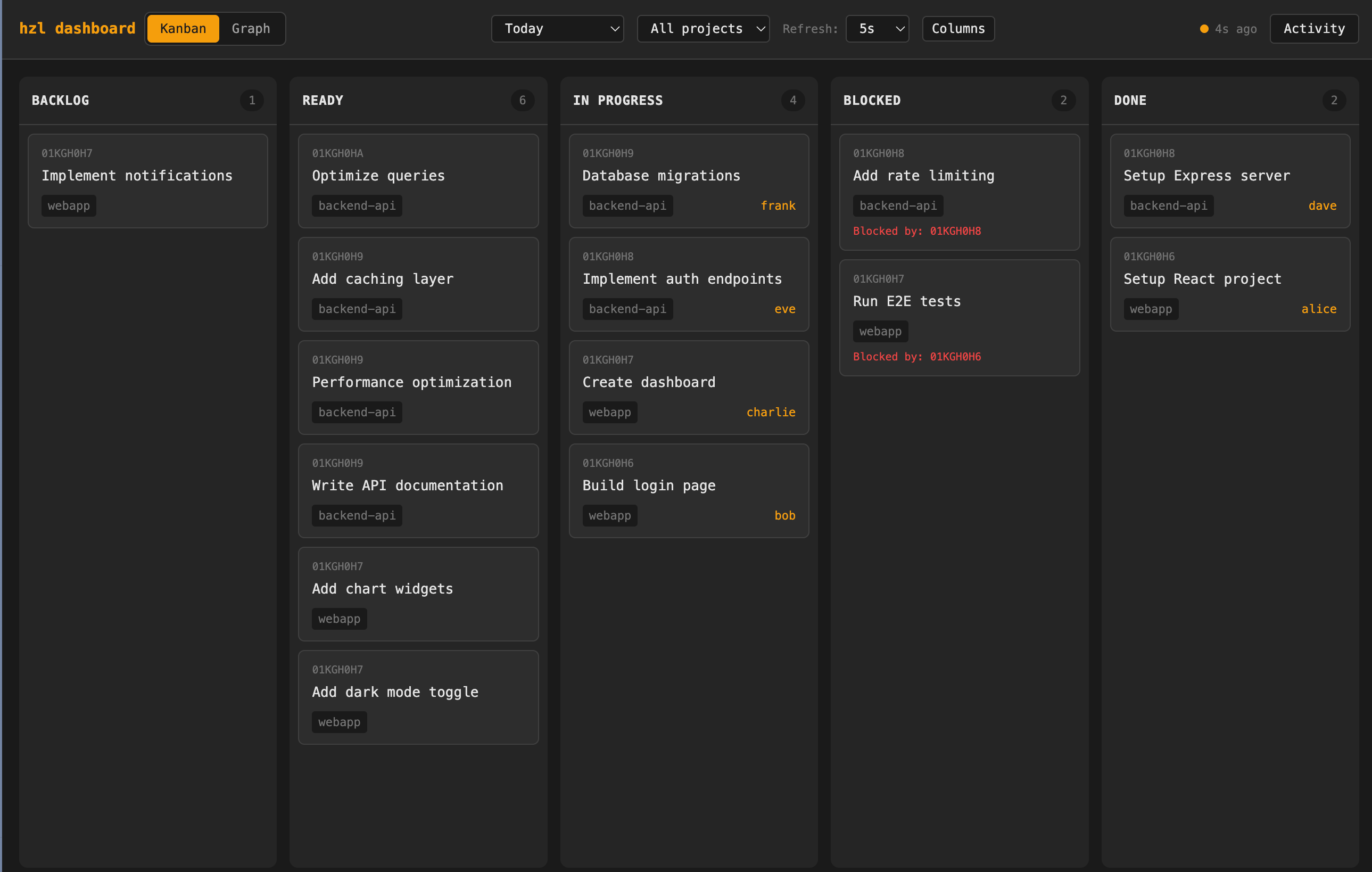
There’s also a web dashboard with a real-only Kanban view, plus skills for OpenClaw, Claude Code, and policy snippets you can drop into your AGENTS.md or CLAUDE.md files.
When it fits and when it doesn’t
If you’re only using Claude Code and nothing else, the built-in task support they’re starting to build may be sufficient for your needs. But the moment you start thinking about multi-session work, even within just Claude Code, you’ll likely hit the same frustrations we did: either a sprawl of markdown files or awkward integration with human-focused project management tools.
HZL works well for multi-step work that spans sessions, workflows mixing multiple agents or models on the same project, non-code projects that still need task tracking, and “kick off a task, check back later” scenarios where you need visibility into progress.
It’s not the right tool for time-based reminders, due dates, recurring tasks, or calendar integration, and it’s not trying to replace org-wide backlogs. If you need rich human workflow features, GitHub Issues, Linear or Jira are better choices.
The sweet spot is personal and very small-team AI workflows where the tracking problem is real but the ceremony of team/enterprise tools are overkill.
From side project to public repo
Kalid and I built HZL because we kept hitting the same frustration and wanted to solve it for ourselves. We’ve known each other for twenty years but had never actually built something together, so this was a good excuse! (and tacos!)
When I’ve shown it to people running into the same walls, the reaction has been immediate positive. My friend Darren Apfel is building Limeriq, a multi-agent workflow tool for VS Code that orchestrates different models from different providers. So by design it runs directly into the tracking challenges HZL addresses. When I showed him what we’d built, his first response was:
“Well, my first feedback is that this definitely needs to exist”.
Hot damn.
We’re not claiming HZL will “change everything”, but so far it’s been a hugely fun to build huge boost for our productivity and visibility into what’s going on. It’s made some larger work items less stressful, so hopefully it’ll work for you?
Try it
If you’re working with AI agents and running into tracking friction, give HZL a look. The documentation is at hzl-tasks.com, and you can star the repo if it’s interesting or file issues or start discussions. You can also hit us up on X at @trevin, and @betterexplained. Build on!
Hey stranger, it’s been a minute. This is an interesting project. I’ve been using GH issues for this and it works but managing the issues is clumsy having to use a combo of tools. The graph tools in particular seem to frequently hit limits if you’re trying to order a number of issues on a backlog to ensure order of operation is correct. I’ll have to check HZL out.