
Making Sense of Claude’s Building Blocks: CLAUDE.md, Commands, Subagents, and Skills

If you’ve been following Anthropic’s updates lately, you’ve probably noticed that Claude has picked up a growing collection of ways to extend what it can do. Between CLAUDE.md, Slash Commands, Subagents, and now Skills, it’s gotten a bit confusing to tell how all these pieces fit together.
If you’re like me, you’ve wondered: “Wait...aren’t Skills just another kind of Subagent? And where do Commands or CLAUDE.md fit in?”
The Core Question: When Do I Use What? I spent some time digging through Anthropic’s SDK docs and experimenting with the API to map out how these features actually relate. Here’s some of what I learned.
CLAUDE.md: Persistent, Always-On Context
Think of this as the project’s constitution.
CLAUDE.md is automatically loaded into every conversation turn. It defines the context Claude should always know: your coding standards, architecture notes, or writing voice. You can reference other docs with `@`, and they’re included automatically too.
It’s always there—automatically applied every turn—perfect for rules or context that should persist across every interaction.
Commands: Explicit, One-Off Workflows
Commands are your manual shortcuts.
They live in .claude/commands/ and are invoked directly with /command-name. A command expands into predefined text or instructions, executes once, and ends there. No magic, no automation—just predictable control.
Use them for repeatable, human-triggered actions. For example, I’ve created a few of my own slash commands to keep Claude consistent with my workflows:
Priming the context of the current branch so I can pickup work from someone else, or resume work from where I left off
Scrub through code comments to fix the typical LLM insanity with over-commenting
Subagents: Isolated, Specialized Delegates
Subagents are independent AI assistants with their own system prompts, tools, and context windows. Useful when a task is complex, multi-step, or needs isolation from the main thread. You can spawn one manually, or Claude can spin it up automatically when a task fits its domain.
They’re perfect for things like code reviews, deep debugging, or multi-phase research. Each subagent runs separately, with its own context window, and returns only the final result, keeping your main conversation focused.
Claude Code uses subagents under the hood, and they automatically inherit your CLAUDE.md context.
Skills: Automatic, Context-Aware Capabilities
If CLAUDE.md sets the ground rules and Commands run your macros, Skills are like the plug-ins that expand what Claude can do. Skills are capability modules: bundles of knowledge and tools Claude can autonomously invoke. Each one lives as a folder with a SKILL.md file and optional code/scripts.
When Claude detects a task that matches a skill’s description (“generate a branded presentation,” “convert a CSV to Excel”, “generate an animated gif under 2MB”), it loads and applies that skill on its own.
This progressive loading system keeps them lightweight until needed. You can think of Skills as giving Claude latent expertise it calls upon only when relevant.
Putting It Together
Once you see how these pieces differ, the puzzle starts to make sense:
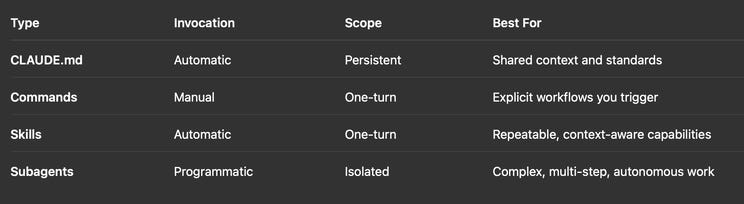
And yes, they work together:
CLAUDE.md provides foundational context
Commands orchestrate workflows
Subagents handle complex delegated work
Skills power specific capabilities along the way
For example, a /deploy-feature command might launch a CI/CD subagent, which then invokes Skills to configure Docker, generate documentation, and format notifications—all while inheriting shared context from CLAUDE.md.
Why This Matters
These concepts sound similar but solve fundamentally different problems:
Persistence vs. Single-turn
Explicit vs. Automatic activation
Shared context vs. Isolation
When you map them on those axes, their roles start to make more sense, and you can combine them strategically instead of seeing them as competing options.
Security and Trust
Because Skills and Subagents both execute instructions (and in some cases code), they introduce new surface areas for prompt injection and misuse. Anthropic sandboxes Skills to reduce risk, but the best practice remains:
Audit Skills like you would software dependencies
Restrict Subagent permissions to the tools they truly need
Treat untrusted content carefully: AI is still parsing free-form text
TL;DR
CLAUDE.md: Always-on context
Commands: Manual shortcuts
Skills: Auto-invoked capabilities
Subagents: Independent specialists
Together, they form a modular ecosystem, each solving a different part of the “how do I make Claude more useful?” problem.
As Anthropic keeps layering on these capabilities, it’s easy to feel lost at first. But once you break them down this way, you start to see the design: a simple, composable system for building your own you start to see the design: a simple, composable system for building your own powerful, context-aware agents.